Product
What nus does, and how it behaves. A terminal and a browser in one window, with an editor pane, an assistant panel, a ports board and a quick terminal around them — one tab list, one set of splits, one config, one set of keys.
Windows and tabs
A window owns its tabs. It is named from the git root it was launched in, else the dominant host, else nus; duplicates number themselves, and F2 renames one through the palette. The name shows in the sidebar, the window list, the OS title bar and the task switcher. A window carries a signal colour, a default shell profile and folder for new terminal tabs, and a browser container (its cookie jar). Ctrl+N opens a new one.
A window may be a folder's. Bind it to a folder — the pin on the FILES tree, or a folder picked in a fresh window — and it becomes that folder's window: the folder's name in the sidebar head and the strip, its tree under FILES, new shells born in it. Unbound, a window follows the focused shell's folder.
Tabs and splits. A tab is one pane or a left|right pair: a shell beside a page, a page beside an editor. The rule between the panes drags. Pane controls — MOVE, SWAP, SOLO, TO A TAB, CLOSE — bloom from a pane's corner when the pointer nears it and fade as it leaves; they are never persistent.
Stacks. A tab that spawns another — a terminal opening a URL beside it, a page opening a link, an assistant opening a tab — nests it under the parent. Stacks nest as deep as they go, fold on a caret, and collapse to one row ("parent · +3") unless active or holding a waiting tab. Drag a row onto another to nest it, or between rows to move it. Closing the parent closes the stack, and asks first.
Tiles. Ctrl+click rows, then Ctrl+Shift+D: two side by side, three as an L, four as a grid. A tiling belongs to its tabs and shows whenever one is active; dividers drag; Ctrl+Alt+arrows walk, with Shift to swap.
Peek. Alt+click a link and it floats over the page behind a scrim. Esc or a click outside closes it; Ctrl+Enter keeps it in the stack.
Compact. Ctrl+Shift+B: a 48px column of icons, the top strip hidden until the pointer reaches the top edge, the hovered row's name beside the column.
Focus. Ctrl+Shift+F11: the page or shell alone in the window.
Containers. Named cookie jars, one browser context each. A window's container colours its square and names its title; new pages open in it, a new window inherits it, and a page can be reopened in another. The palette makes new ones.
Tabs opened by others. A tab a shell, an assistant, a rule or another app opens lands behind, with a slip at the foot — opened behind · host · click to go. TABS · OPENED BY OTHERS chooses BEHIND, WITH A TOAST or IN FRONT.
Closing is terminating. Closing a tab, a shell, a split or a stack ends what it was running — the whole process tree, not just the shell, so a dev server started from a closed tab never lingers on its port. A shell at its prompt closes without a word; one running something names it and asks (TERMINAL · CLOSING: ASK WHEN BUSY or NEVER ASK). Every closable thing carries an × on hover.
The sidebar
Hidden by default: hovering the window's edge slides it over the content, and it hides shortly after the pointer leaves; Ctrl+Shift+S pins it. It can sit left or right, reveal from the screen edge or only from inside the window, and stay hover, hidden or pinned in fullscreen.
Rows. One line per tab: a favicon or profile icon, the title, the folder or host, a ⌘-numeral for the first nine, a waiting dot, an × on hover. A row names the focused pane and badges the split's other pane at the icon's corner. Text that does not fit marquees while its row is active or hovered and clips under a fade otherwise — never an ellipsis. Right-click a row for RENAME, ICON (an emoji or any short string in the favicon's place), a row of swatches, PIN, CLOSE, TILE and SAVE TO FOLDER.
Header. BAR — the window's name and NEW TAB in one ruled row — or RAIL — every window as its square along the sidebar's edge. NEW TAB is the button hit most: click for a shell in the default profile; hold, right-click or the caret fans the kinds out.
Folders. Under the tabs: GITHUB (open pull requests involving you, from gh), PORTS (what is listening), FILES (the folder's tree), lists from rules.luau, and your own (SAVE TO FOLDER; a saved page never archives).
FILES. The sidebar's second page, Ctrl+Shift+E: the folder's tree — folders first, dot-files and heavy folders (node_modules, target, .git…) dim and closed until asked. A click on a file opens it in the editor beside the shell as a preview the next click replaces; a double-click keeps it. The tree re-reads while shown.
Footer. One row: your avatar (the profile card), +, history, downloads, settings. Drag the sidebar's inner edge to resize it and the footer's rule to change its row height; below about 105px the list shows icons with tooltips.
Keys
App chords are ⌘ on macOS and Ctrl+Shift on Windows and Linux, so they never reach the shell (Ctrl+T/K/L/W/D/R are shell keys). Ctrl+1–9 is the one plain Ctrl chord. F1 opens the keyboard guide; SETTINGS · KEYS shows every chord as keycaps.
| Windows / Linux · macOS | Action |
|---|---|
| Ctrl+Shift+T · ⌘T | new tab (the palette in new mode, or your start page) |
| Ctrl+Shift+K · ⌘K | the palette |
| Ctrl+Shift+L · ⌘L | address the browser pane |
| Ctrl+Shift+W · ⌘W | close the tab (every selected tab; asks if something is running) |
| Ctrl+Shift+Z · ⌘Z | reopen the last closed tab |
| Ctrl+Shift+D · ⌘D | toggle the browser split |
| Ctrl+Shift+S · ⌘⇧S | pin the sidebar |
| Ctrl+Shift+E · ⌘⇧E | the FILES tree |
| Ctrl+Shift+B · ⌘⇧B | compact |
| Ctrl+Shift+H · ⌘⇧H | history and replay |
| Ctrl+Shift+P · ⌘⇧P | the ports board |
| Ctrl+Shift+? · ⌘⇧? | ask, beside a shell |
| Ctrl+Shift+R · ⌘⇧R | reader mode |
| Ctrl+Shift+F11 | focus: one pane alone |
| Ctrl+1–9 · ⌘1–9 | tab by position |
Ctrl+· ⌃ | cycle tabs most-recently-used |
| Ctrl+PgUp / PgDn · ⌘⇧[ ] | previous / next tab |
| Ctrl+Enter · ⌘↵ | open the URL at the prompt in the split; +Shift for a new tab |
| Ctrl+N · ⌘N | new window |
| Ctrl+J · ⌘J | downloads |
| Ctrl+, · ⌘, | settings |
| Ctrl+` (global) | the hatch |
Browser panes mirror Chrome while focused: Ctrl+L, Ctrl+R / F5, Alt+←/→, Ctrl+plus/minus/0, Ctrl+F, F12. Ctrl+Shift+C on a page copies its address.
The palette
One field for everything addressable. go: your tabs first, then actions, then opening or searching what you typed — URL and search are auto-detected and both rows are always offered. new: profiles for a shell, or a URL for a page. url: address the browser pane. Recent commands come back as rows you can run again; every settings row is a palette row that opens settings there; layouts, held shells, the journal and home are rows too.
chains in rules.luau names lists of palette commands — "open <url>", "run <cmd>", "tile", anything the palette takes — as one row.
Home
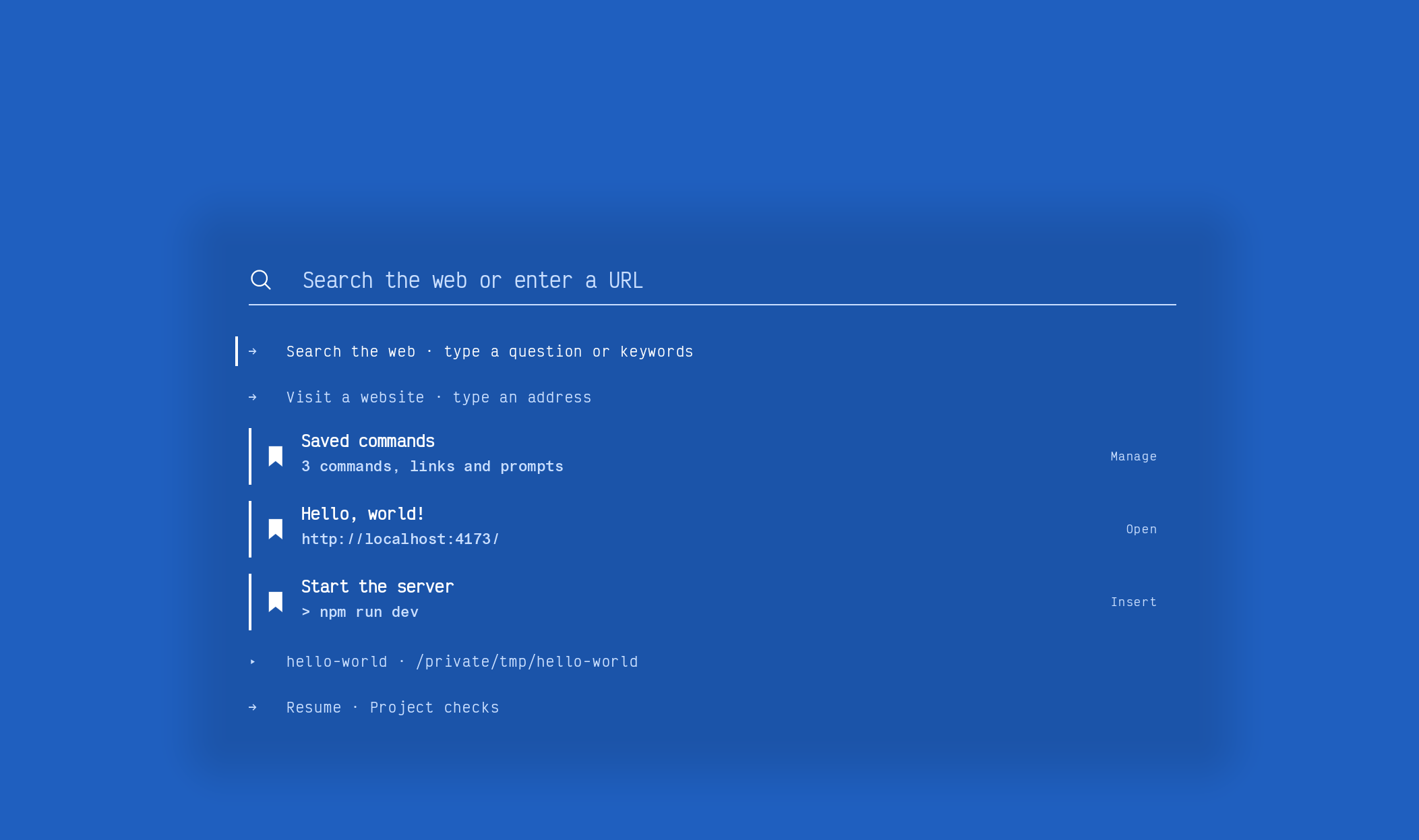
The window's first tab, and what an empty new tab opens: a terminal with no PTY behind it. One line, centred, a caret in the signal colour. A URL and Enter: the pane becomes that page. A command: the pane becomes a shell running it. Enter on nothing: a shell. As you type, rows come up beneath the line — tabs, recent pages and shells, projects, layouts, history, held shells, assistants, settings — and ↓ moves onto them.
Routes. The foot of the line is four marks: a shell, a page, an assistant, the rows. The one Enter would take is lit; click one and its prefix lands on the line. > command, ? search, @claude prompt, @codex prompt and @ollama prompt always work. SETTINGS · PROMPT offers Shell, Web, Assistants, Mixed and Minimal starting points, lets you order the sources and set how many rows each shows, and saves shortcuts.
While you were away. After five minutes unfocused, or since the last session was saved: what failed, what ran long, what still runs (here and held), who is asking for hands — each row opens the shell it names.
The view behind the line. THE LINE, THE PLATE — the app's own icon, your last places as stops on its band — or an ART: one Luau file that draws behind the line every frame. Four ship: the pond (koi that keep off the line, gather when you type and shy from the pointer), memphis, space (the sky over a place you choose; never inferred) and the brain (every process on the machine as three trees). ADD YOUR OWN writes a blank into profile/art/ and opens it in the editor; ASK FOR ONE sends the canvas document to the assistant. Arts go still when the window is not looked at and draw every other frame on battery.
Startup
STARTUP · THEN: the prompt, the home page, a custom layout, or the last page. New tab uses the same choice. Restore brings back every window with its tabs, stacks and container, and each terminal's scrollback as read-only history above a fresh prompt. REMEMBER: TABS AND WINDOWS, or NOTHING.
A new window is a surface of its own, never a copy of the one that asked: the prompt with the folders it could be in its rows (pick one and it becomes that folder's window), a shell in the asking window's folder, or the same as launch.
Terminal first, or browser first. STARTUP · FIRST decides what NEW TAB and an empty Ctrl+T open, which rows the palette leads with, and where links from other apps arrive — a small floating window with one page (little nus; Esc closes, Ctrl+Shift+O keeps it as a tab) or a tab in the window. MAKE DEFAULT registers nus as a browser.
Splash. The icon, the icon with a sound, or none; the window remembered, maximised or fullscreen; start on login.
The terminal
Its own VT core: the grid, scrollback, modes, palette and responses are nus's; vte drives the state machine. Rendered on the GPU from a glyph atlas, with ligatures, system font fallback for symbols and other scripts, and colour emoji.
Shell integration, without a plugin. nus injects its hooks for PowerShell, bash, zsh, fish and cmd; nushell has it built in. Over ssh, the bootstrap writes the scripts to ~/.cache/nus on the far side over the same connection — nothing installed there. It buys: prompt marks (OSC 133), the folder (OSC 7) and progress (OSC 9;4); a bar cursor at the prompt; new shells where the focused one is; the window's name from the folder; jump between prompts; copy the last output; DONE / FAILED badges and a ring when a long command ends elsewhere; no close-confirm at a prompt. AUTO or OFF under TERMINAL.
Blocks. Every command is a block over its marks. A lamp on the prompt's row: green ran, red failed, dim unknown, breathing while it runs. Click the lamp (or Ctrl+Shift+←/→) to fold the output to one line; Ctrl+↑/↓ walk the blocks; Ctrl+A twice selects a block's output, thrice everything; Ctrl+Shift+/ filters by command. Hover a block: share, run again, copy. Share writes a page — command as heading, output as pre — and opens it beside the shell; the palette offers copy-as-markdown and a gist through gh. The scrollbar's ticks are the prompts.
A diff in a block is a diff. Chips on every @@ line: STAGE and REVERT for git diff, UNSTAGE for --cached, APPLY for any other diff — an assistant's patch, cat x.patch — one hunk through git apply in the shell's folder.
The command line, lit and predicted. Tokens colour as you type — command, flag, string, number, path, operator — from the theme's ANSI slots, through tree-sitter grammars for bash and PowerShell that ride in the binary. The history entry that continues your line ghosts after the caret; Right or End accepts it. History is per profile. The prompt line has a language server too (TERMINAL · PROMPT LSP: QUIET, MENU or OFF): a dotted underline on a diagnostic, completions riding the ghost, Tab to accept.
A URL at the prompt. If the whole line at a fresh prompt is a URL — a scheme, localhost[:port], or host.tld[/path] with a known TLD — Enter opens it in the split beside the terminal (Ctrl+Shift+Enter: a new tab), with a ruled hint as you type. Any editing key disqualifies the line. Bare words never trigger.
Links in the shell. A URL in the grid or an OSC 8 hyperlink underlines under the pointer, and a click opens it where LINKS says pages go — after a band asks, the first time on a host (D: never ask again). TERMINAL · CLICK LINKS: ASK, OPEN or HINTS ONLY.
Interaction. Selection with semantic zones; copy and paste, bracketed, with a hazard band when a paste looks risky; click-to-move at a prompt; a thin scrollbar on hover; find in scrollback as a band; hints mode (labels over URLs, paths and hashes); an unfocused split washes with paper; a cols × rows card while resizing. The shell scrolls on eased curves, a line at a time, more ticks extending the trip; Shift+PgUp/PgDn and Ctrl+Shift+Home/End ride the same curve.
The caret is four critically damped springs, the leading corners fast and the trailing ones slow, drawn as one quad. Shape (the shell's, block, beam, underline), hollow or hidden when unfocused, blink never / after 2s / always, colour (the theme's caret, the signal, the tab's own), motion jump / glide / comet, and TRAIL.
Program colours. TUIs bring colours picked against someone else's background. TERMINAL · PROGRAM COLOURS: AS THEY COME · 3:1 · 4.5:1 AA (default) · 7:1 AAA — any text that cannot be read against its paper is walked toward white or black until it reads. TRUECOLOUR: AS SENT, or THE THEME'S SIXTEEN — truecolour and the 256 snapped to the nearest of the theme's in Oklab, so a program wears the theme. A shell's own OSC 10/11 colours can be applied to the look on OFFER, ALWAYS, or kept to the pane.
Images. Kitty graphics, iTerm2 inline images and Sixel draw in the shell.
Progress. OSC 9;4 runs as a line under the tab's sidebar row and the strip crumb — red on error, gold on warning, a marquee while indeterminate — and on the Windows taskbar button.
Attention. BEL, OSC 9 and OSC 777 notifications, and command finished from the prompt marks. Shown as a filled label in the sidebar and in the top strip summary; an OS notification when the window is unfocused. An assistant block is working (breathing lamp) or waiting for you (filled signal, the taskbar), with its name in the row's tooltip. Silence is never read as a request for input.
Kept alive. Every shell's pty lives in a small holder process that outlives the app (TERMINAL · KEEP ALIVE, on by default). Quitting, crashing or updating leaves the holder and its process running; the next launch reattaches and replays the last 4 MB of output, so the screen is what it would have been. A held-but-unattached shell carries a held icon in the sidebar and the atlas. Close on a running process: CLOSE · DETACH · CANCEL. nus hold ls · attach <id> · kill <id>.
Cut off. After a restart, a block with a start mark and no finish mark is the command the restart killed: a ruled line under the snapshot with one chip — RESUME for claude and codex (their own resume commands, the latest session for that folder), RUN AGAIN for a server or watcher, RECONNECT for ssh. TERMINAL · CUT OFF: CHIP, RUN AGAIN or OFF.
Journal. One line per finished block in profile/journal/<cwd>.jsonl: command, folder, start, duration, exit, tab. nus log, the palette's log rows, and the chip a folder offers — 14 commands here this week. On, off, and how long to keep.
Conformance. TERM=xterm-256color, COLORTERM=truecolor, TERM_PROGRAM=nus. DA1, DA2, DA3; XTVERSION answers nus <version>; XTGETTCAP answers TN, RGB/Tc, colors, setrgbf/b, Ms, Ss/Se and Smulx and refuses the rest; DECXCPR; XTWINOPS 11/13/14/16/18/19/22/23; DECRQSS for SGR, DECSTBM, DECSCUSR, DECSCL and DECSCA; OSC 8, 52, 133, 7, 9;4, 1337 and 10/11; the Kitty keyboard protocol; synchronized output (mode 2026); bracketed paste; focus events. Mouse reporting: modes 1000/1002/1003 with X10, UTF-8 (1005), SGR (1006) and SGR-pixel (1016) encodings; Shift keeps the click for selection; the wheel reports when the application has the mouse, is arrow keys under alternate scroll (1007), and scrolls the terminal otherwise.
History and replay
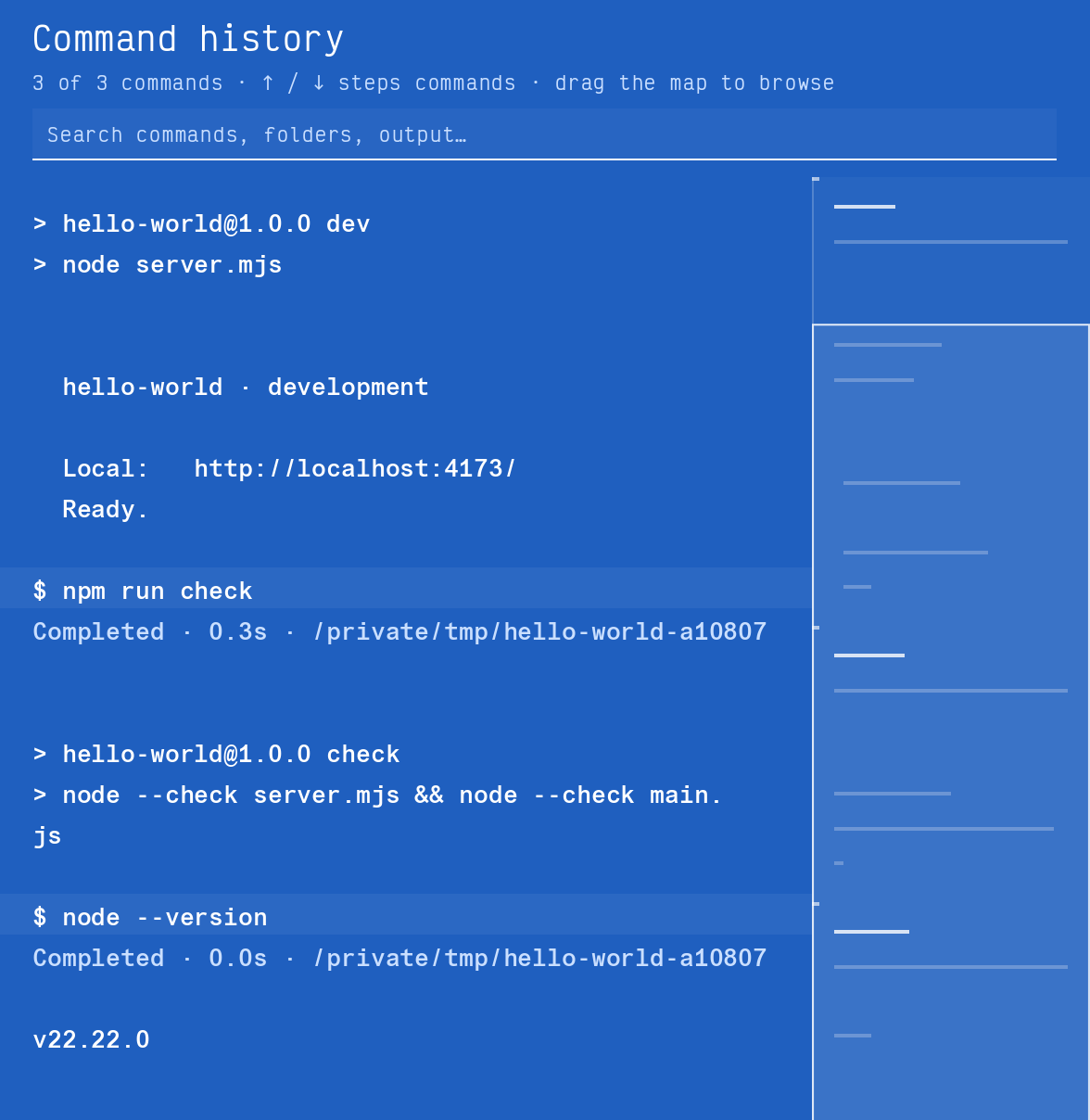
Ctrl+Shift+H opens the session as a continuous, searchable document with a map at the right. Command boundaries are detents on the map, failed commands have stronger ticks, and the viewport shows what is visible; drag it to browse, click to jump, arrows to step between commands. Search covers commands, folders, status and output. Copy never executes. Esc returns to the live shell, which kept running the whole time.
Every shell pane records its own asciinema v2 stream, with resizes and the command markers, under profile/replay/. Playback scrubs through the recording in the same VT core, so the picture is exact; a page beside the shell keeps a still per block, with before / after / diff. nus share and Playback's export write one self-contained HTML file — the document, the map, copy controls, the transcript and the cast — that needs no server and no nus. Recordings are kept 7 days, 1 day, or not at all.
The browser
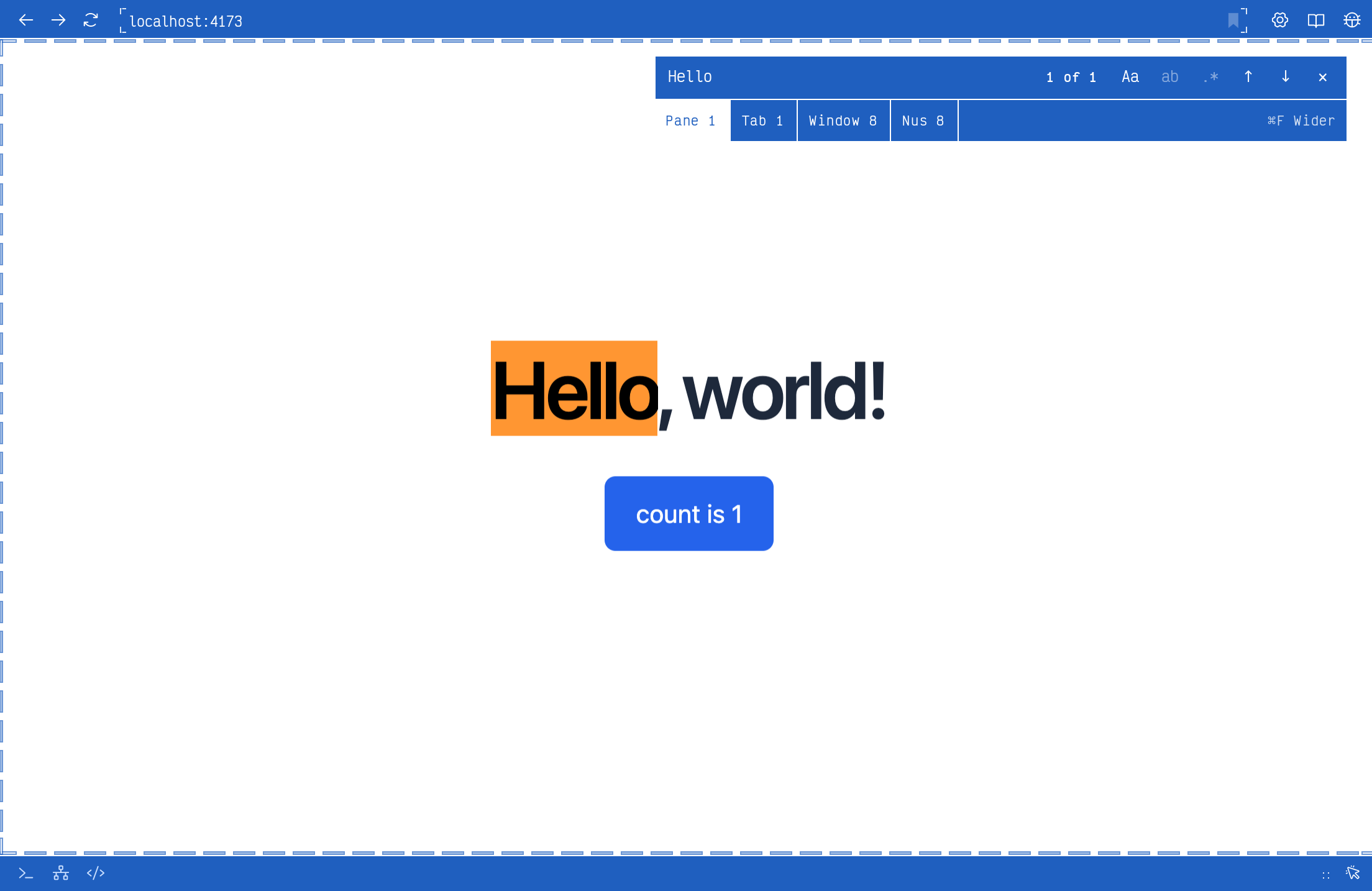
Chromium, rendered offscreen and composited by nus. New tab opens the palette or your start page; URL or search from there. The search engine is yours to set. Third-party cookies are blocked by default, with per-site exceptions.
Local sites. localhost, 127.0.0.1, *.local and RFC-1918 addresses get hazard tape around the page and in the URL field, so a dev server never passes for the real thing. Devtools — console, network, elements — are a pane composited beside the page, not a detached window; the page's console mirrors into the terminal split. Responsive presets at 390 / 768 / 1440, a screenshot taken from the page's own texture, and reload on directory change.
Click to source. On a localhost page, Alt+Shift+click an element and the editor opens at its source: a source map first, then a framework's debug marker (React, Vue, Svelte), then the served file under the project.
Reader. Ctrl+Shift+R or the book: the article extracted and set in Newsreader on the app's paper — a 640px measure, rules not boxes, mono code. The page keeps living underneath; the text feeds "ask about this page".
Content blocking, built in: a request-handler blocker with the standard lists, plus profile/blocklist.txt; per-site off in the site panel. Boosts: on_page(ctx) in rules.luau returns CSS and JS per site.
The site panel. The gear at the end of a URL row, per host: zoom (remembered), autoplay, JavaScript, cookies (block or clear), boosts, blocking, and the permissions the site was given — band answers are remembered, each forgettable.
The page's menu. Media first — SAVE VIDEO AS, SAVE IMAGE AS, COPY THE ADDRESS, PICTURE IN PICTURE — then the link, then the page.
Downloads. To ~/Downloads, with a footer icon that shows progress on hover and opens the ledger: quiet rows, pause / resume, cancel, retry, open, source and reveal. Ctrl+J opens the full page with search; clearing history leaves files in place. Retry keeps the original container; BROWSER · FILE NAMING can name documents, images and media after the page.
Picture in picture, nus's own: a tab's texture drawn into a small always-on-top window when a playing video's tab leaves view, or on demand. Transport keys act on the element through the devtools protocol, so sites cannot hide them. Drag any edge to resize; one PiP per process.
Table stakes. Find in page, <select> popups composited, permission asks as a band, history-ranked address rows, favicons with a letter tile for pages without one, idle pages sleeping after 30 minutes and archiving after 12 hours, a status lamp per page (signal while loading, ink when live, hazard stripes when local, hollow while asleep).
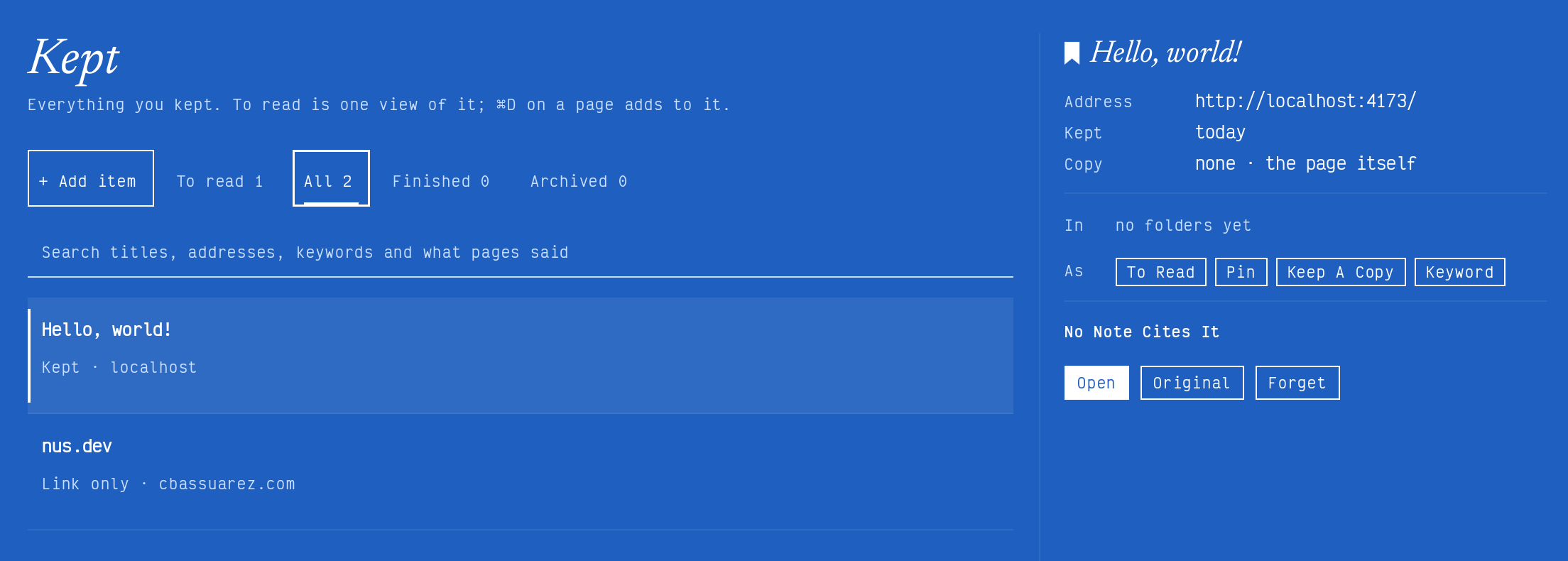
Kept pages. Keep the page in front with the bookmark control or Cmd+D on macOS. The Kept collection brings saved titles and addresses together, with actions to reopen the original, pin an entry, or mark it to read.
Tidy. Suggestions only. A page open elsewhere gets a band on the newer tab. TIDY — from the palette, or hourly / daily — proposes groups (by host, project folder, or group(tab) in rules) as a sheet with make-a-stack, archive or skip per group; nothing moves until you tap.
Import. Bookmarks, history and spaces from Chromium-family browsers — Arc, Chrome, Edge, Brave — one-shot.
No Chrome extensions. Windowless Chromium cannot host them; what they are used for is built natively — blocking, boosts, the reader, containers, tab tools — and password filling through the op and bw CLIs.
The editor
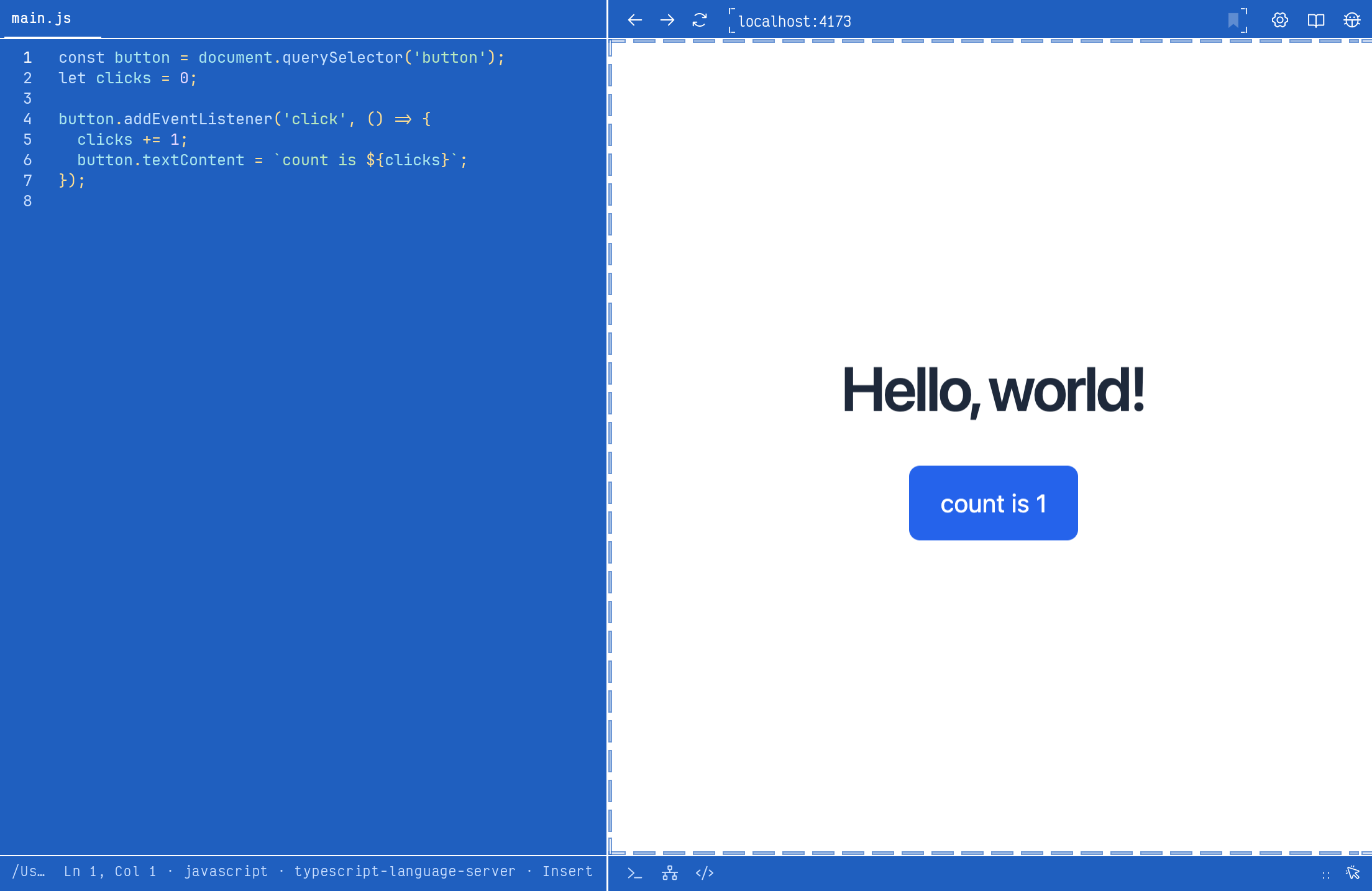
A full editor pane: open a file from the prompt (nus <file>), a click on a path, the FILES tree or the URL row. Multi-buffer, find and replace, format-on-save, tree-sitter colour, and a language-server client — hover, completion, diagnostics, go-to-definition, formatting — with servers spawned per language on demand. Grammars beyond bash and PowerShell load from profile/grammars/<name>/.
Optional tools. The welcome page's OPTIONAL TOOLS is the first launch's one question: language servers (rust-analyzer, PowerShell Editor Services, bash-language-server, typescript-language-server, pyright…), grammars and assistant CLIs, each fetched only on GET, each a folder you can delete. profile/bundles.json adds to the list.
Assistants
Ask. Ctrl+Shift+? beside a shell: one line in, a few command blocks out, each with INSERT (at the prompt), RUN and COPY. Chips above the field say what goes along — the shell, the block in focus, the page beside (through the reader), the tabs, the editor, memory. Not a chat; the last turns scroll. The backend is what the machine has: claude, codex, the Copilot CLI, ollama, or the API through curl; LOCAL mode streams from a declared assistant or ollama so it reads as instant. Skills are rules (skills = { name = { prompt, context } }); memory is profile/memory.md, and the book icon on an answer keeps its first line.
Sessions. SETTINGS · ASSISTANTS is the hub for Claude, Codex and Ollama: it checks the executables, versions and sign-in, opens editable task, planning and review prompts as real terminal sessions (the command and folder shown before anything starts), and stages the MCP registration commands for review. nus never rewrites a provider's account.
Eyes. nus mcp is an MCP server that gives the assistant in the shell the page beside it, as you see it, logged in as you: tabs, page info, page text (the reader), DOM, console, network, a screenshot from the pane's own texture (never the OS screen), blocks, ports, the journal, held shells. claude mcp add nus -- nus mcp, the same for codex.
Hands. Click, type, scroll and navigate, by the devtools protocol on the pane. Every hand leaves an icon chip under the URL row for a minute, and a line in the page's log. ASSISTANTS · HANDS: ASK (a band over the page — claude wants to scroll down · ALLOW · DENY · ALLOW ON THIS HOST; any other key or a click on the page takes over and tells the tool so), ALWAYS, NEVER, CONFIRM SUBMIT, and the allowed hosts, forgettable.
Transcripts. OPEN TRANSCRIPT on an assistant block: the session as a page beside the shell, tool calls folded, following live while it runs.
The ports board
Ctrl+Shift+P, the status-cluster icon, ports in the palette, or the PORTS folder's header: a centred sheet in the departures-board manner — ruled monospace rows that split-flap in and out as ports arrive and depart, a lamp per row (UP · EXPOSED · DYING). Grouped by origin — MINE (ports your nus shells started), OTHERS, SYSTEM, CONNECTIONS, DOCKER / WSL — or by port or process. A row knows the process, pid, command line, folder, owning tab, bound interface (0.0.0.0 gets the exposed lamp and a warning stripe), uptime, protocol and, when probing is on, an HTTP probe. Enter opens the detail: OPEN (tab / split / peek), COPY URL, JUMP TO SHELL, KILL (graceful, force after 3 s), RUN AGAIN, TUNNEL (cloudflared or ngrok, the public URL on the row), WATCH, and a rename. A new port lights the status icon — 5173 · vite is up · O to open — never stealing focus.
Ports that remember. On restore, a port that was listening — 5173 · vite · npm run dev in ~/proj — offers START AGAIN, which opens a shell there and runs it.
Settings: grouping, open in, poll rate, the new-port toast, what to show, ask before kill, probe, tunnel tool, hidden processes. ports in rules.luau names, tints, auto-opens, auto-tunnels, hides or watches by port or process.
The hatch
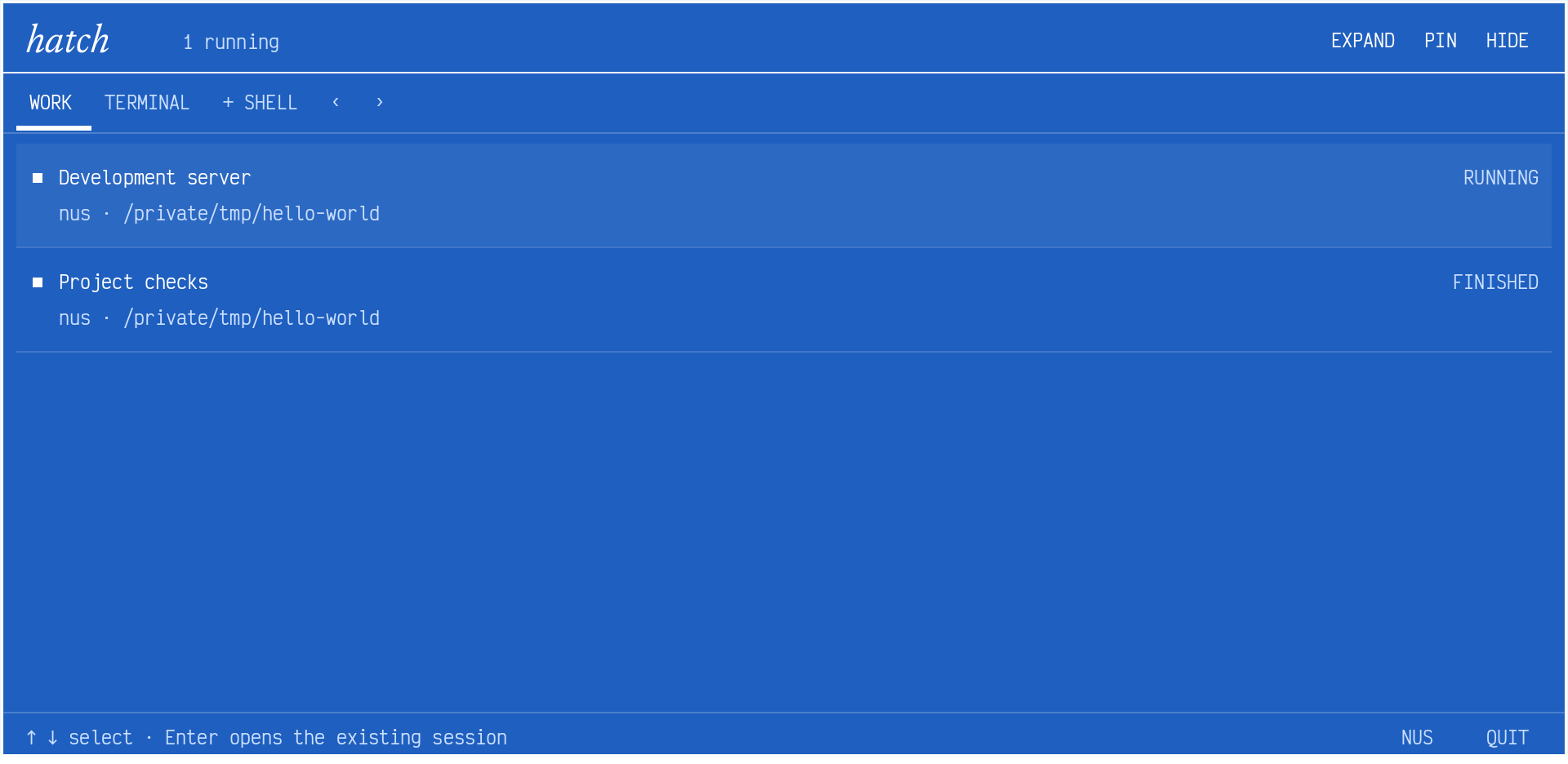
A quick terminal on a global hotkey — Ctrl+by default; Win+ or Ctrl+Shift+Space — that works whether or not nus is in front, on the monitor under the pointer. It opens an overview of real terminal work across every window: rows for running, finished, failed, needs attention and needs input, with the session's name, window, folder and exit status. Select a row and the original pane comes up — the same pane machinery, so blocks, marks, ports, ask and the prompt LSP all work up there. + Shell makes a new one; HOIST (Ctrl+Shift+↑) sends the tab you are on up, LAND (Ctrl+Shift+↓) brings the hatch's tab down as a normal tab.
Two looks: a SHEET that drops from the top edge (from the camera housing on a notched Mac), or a CARD centred on the screen. Pin keeps it from hiding on focus loss; Esc hides. Optional six-second completion notices and a compact status along the top edge, neither of which takes focus. A menu-bar or tray entry — Signal — opens a drawer of work rows, downloads and quick actions on macOS, Windows and Linux (StatusNotifierItem); the same drawer opens from the footer. Keep nus in background keeps sessions alive with every main window closed; Quit nus exits everything.
On Wayland, bind nus hatch toggle in your desktop's shortcut settings; the compositor controls placement and focus.
Remote control
A JSON-lines protocol on the instance port with a per-launch token, and the nus command that speaks it: ls · open · edit · launch · split · send-text · focus · close · theme · look · ports · hatch · block · ask · raise · hold · log · share · ssh · sync · version. A bare nus <file> or nus <url> opens it; nus ssh <host> [--split] opens a shell with the integration along. Rules call nus.run(cmd, args). Layouts are Luau: a .nus.luau returns the window's tabs — { shell, cwd, run } | { page, beside } | { edit } — and can compute them; SAVE THIS WINDOW AS A LAYOUT writes one.
The phone. SYNC · THE PHONE serves this window on the local network as a page: what ran and failed while you were away, what is listening, hands to allow or deny, the tabs, and a line to ask. A token in the address, this network only; turning it off revokes the address and closes the listener.
The look
Broadsheet. Ink on paper, one monospace face, rules instead of boxes, and one colour on screen: the window's signal. Paper and ink follow the OS theme and switch live, or are pinned. The design page has the tokens.
The look studio. LOOK is one section with a live proof of the window at the top and tabs beneath — PRESETS · SURFACE · TOKENS · TYPE & MOTION · CURSOR. Presets are cards faced with their own ramp; tokens are tiles with a real picker — hue, saturation, lightness, and a tray of candidates. Any token can be any colour.
Surface. A signal colour; ramps of two to four stops with angle, loop, aurora drift and breath; textures — grain, stipple, stitch, linen, halftone, scale — on the carapace, the chrome or the panes, never on content or video; window opacity; a carapace as a band or a frame, with width and radius. Presets, and profile/surfaces/*.json.
Theme. Paper, ink and page tokens per mode, a caret and a selection colour, sixteen ANSI colours, contrast grade and saturation. Twenty stock themes — thirteen originals and seven ports (Nord, Gruvbox, Catppuccin, Rosé Pine and more) — each with a surface, cursor, loading bar and sounds. Import from Ghostty, Windows Terminal, VS Code or base16 files in profile/themes/. The footer's theme picker holds nine slots you choose.
Type. Curated pairings with a live specimen; independent interface, terminal and editor families, weights and sizes; line and column spacing. Bundled: IBM Plex Mono, Victor Mono, JetBrains Mono, ABC Areal (and its Semi Mono and Mono); installed monospaced fonts too. Newsreader Italic for the wordmark and the reader.
Motion. One easing, base durations of 80–220 ms, and a register from snappy (0.45×) to cinematic (2.2×). Things slide and rules extend; nothing scales, bounces or blurs. Reduce motion follows the OS or is forced. The loading bar chases real progress as a rule, a comet, or the whole carapace.
Sound. Seventeen synth recipes on a native synth — tone and noise layers, envelopes, glide, detune — across fourteen events, each mapped to a cue or silence, each previewable; master volume; rules can override per event.
Hover. Every icon button gets a soft ink overlay under the pointer; the important ones move on the motion register. No icon is a bare glyph you have to guess at. Touch: a finger that lands moves the pointer, held a beat it is a hover, lifted quickly a tap; once a touch has been seen, hit targets grow.
The icon. A Newsreader italic n with an open, tapered band in orbit. The live icon follows the theme and the signal; the Dock and menu bar follow the last-focused window's colour.
Rules
profile/rules.luau, sandboxed Luau — no io, no os, no FFI, no arbitrary require — reloaded on save, with five starters and a syntax-coloured preview in settings. Rules come first and settings second: every setting is a hook's most common answer with a name.
| Hook | Returns |
|---|---|
new_tab(ctx), new_space(ctx) | a look: { bg, signal } (the default gives each terminal its own hue and keeps a stack in the parent's family) |
on_page(ctx) | boosts: { css, js } per site |
on_event(ev) | a sound cue, or false |
on_block(b) | { fold, notify } |
on_progress({ state, tab }), on_port_missing(p), on_cutoff(b), on_tidy(groups), on_open_layout(l) | what to do about it |
program(p) | contrast, snap, ansi, remap for one program's colours |
group(tab) | a tidy group |
ports, folders, chains, skills, assistants | tables |
Helpers: hue, mix, hsl, nus.run(cmd, args), env.
Settings
Ctrl+, opens a native settings tab, grouped LOOK · FEEL · WORK · SYSTEM · YOU, every page the same ruled two-column form; under 900px it becomes tiles that drill in. Every edit writes the profile's settings file, which is the source of truth and hot-reloads across windows. Every settings row is a palette row. Ctrl+F searches every control, option and explanation, ranks exact labels first, forgives a typo, and jumps to the row.
Width, not mode: wide (≥1200px) shows everything; standard hides the sidebar until hovered; narrow (<900px) drops the split and gives the focused pane the window.
The profile
You, on this machine: a name, a face (an initial, an emoji, or a picture you pick from a file), and the day it began — in a folder on your machine. No server, nothing counted, nothing sent. The card rises from the avatar in the footer; the first time it walks you through, and after that it is the profile at a glance.
Sync, without an account. A key you copy — made once, shown as a word, pasted on the next device. Carriers you already have: a folder your OS or Syncthing moves, a private git remote, or a private repo on GitHub, Forgejo, Gitea or GitLab that nus makes for you. Only ciphertext leaves — every file sealed under the key, names hashed — and last writer wins with the loser kept beside it. Settings, the profile, rules, folders, ports, memory, sites, containers, the blocklist, the avatar, layouts, themes and surfaces travel; the device's name never does.
Profiles and platforms
Every Host in ~/.ssh/config is an ssh:<name> profile; on Windows every WSL distro is a wsl:<name> profile; "Open in nus" in Explorer, Finder and file managers. The chrome is an accessibility tree from the first frame: every hit target is a node with a spoken label and an action, panes carry their text, the palette is a list box.
Updates come from GitHub Releases, offered in the top strip; you can decline. There is no telemetry: crashes write a local log and stay there.